How To Improve Your LinkedIn® SSI Score (2026 Edition)

Your LinkedIn® SSI (Social Selling Index) is measure that ranks your utilization of LinkedIn® as a selling tool. Learn how to improve it.

Fox Tucker
LinkedIn® Coach:

Lesson Introduction: What's is Your LinkedIn® SSI Score?

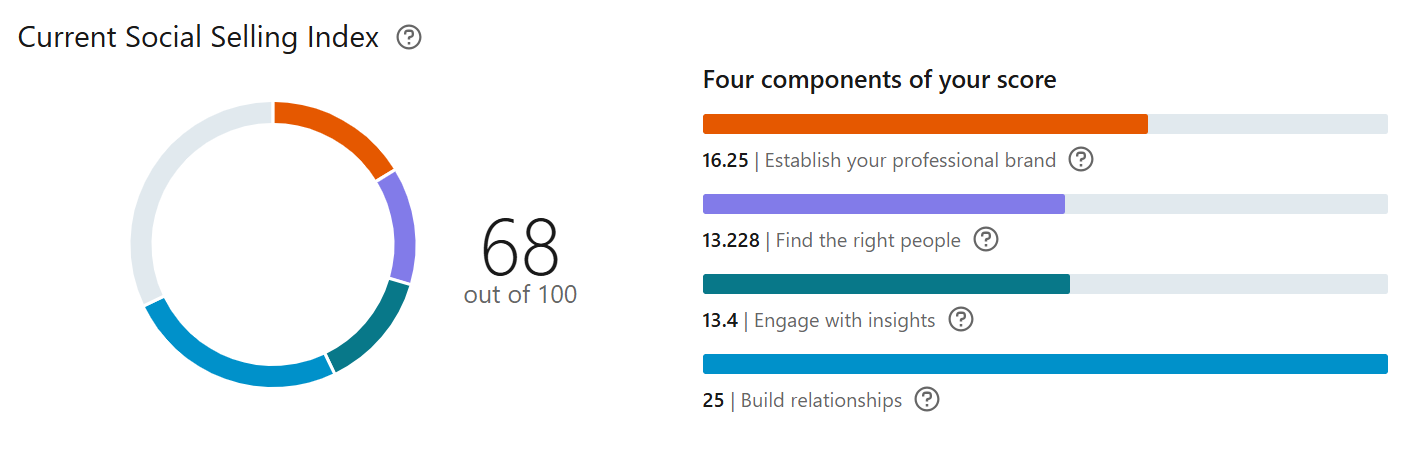
Everyone On LinkedIn® has a LinkedIn® SSI score. It’s a measure that ranks a company or individual’s utilization of LinkedIn® as a selling tool, based on 4 core activity types.

How the score is calculated has been a point of speculation and hunches for a long time. Now, after years of digging for insight, I found the answer hidden away in the Polish Language version of LinkedIn® Support.

This free course shows you the specific actions required to improve your LinkedIn® SSI score.

How Do I Find My LinkedIn® SSI Score?

It’s easy. Visit https://www.linkedin.com/sales/ssi using a browser on your dektop, laptop, etc.

It’s a good idea to make a note of your current score before taking the actions shown in this course.

Who Can See My LinkedIn® SSI Score?

It’s not public. So no one else can see it.

However, if you are a Sales Navigator customer within an organisation, your team on Sales Navigator and your admin can see your SSI score and a leaderboard of individuals on your team. Admins may also be provided insights into how members of your team (including yourself) can increase their SSI scores.

What Are The 4 Components of your LinkedIn® SSI?

A variety of data associated with your personal LinkedIn® account is used to calculate your SSI score. This data includes the following four Components:

  • Data about your professional brand
  • Data about your use of LinkedIn® to find prospects
  • Data about your engagement On LinkedIn®
  • Data about your relationships

Your Professional Brand On LinkedIn®

There are just two professional brand elements that affect your LinkedIn® SSI score:

  • The completeness of your LinkedIn® profile, including the endorsements you’ve received
  • Articles you’ve published and the number of followers resulting from your articles

Action Points

I was surprised that there are only two elements that affect the professional brand component of our LinkedIn® SSI score.

Action 1: Get your LinkedIn® Profile completed. Go beyond the basics with my Utlimate LinkedIn® Profile Optimization Guide. 

Action 2: It empathises “endorsements you’ve received” – The only endorsement feature of your LinkedIn® profile is Skills Endorsements.

So, ask colleagues and clients to endorse your skills.

Action 3: It specifically mentions creating articles (rather that posts).

The action is to create LinkedIn® Articles about your area of expertise.

It also states “and the number of followers resulting from your articles.

The implication is that we need to create articles that are interesting enough to generate new followers.

Your Use Of LinkedIn® To Find Prospects

There are just three find prospects elements that affect your LinkedIn® SSI score:

  • People searches
  • Profile views
  • Days active

Action Points

Okay this is pretty straight forward.

Action 1 for Days Active. Log in to LinkedIn® often. I do it daily Monday to Friday.

Action 2 and 3 for People searches and Profile views –  Search for people then click through to their profiles.

Your Engagement On LinkedIn®

There are just three engagement elements that affect your LinkedIn® SSI score:

  • Shares, likes, comments, and reshares
  • Messages sent and the response rate
  • Groups joined and your engagement within Groups

Action Points

This is the stuff we should be doing anyway, regardless of our LinkedIn® SSI score. 

Action 1: Share posts, Like posts, Comments on posts, Reshare posts.

Action 2: Send messages, but keep an eye on the response rate. LinkedIn® is tracking how many reponses your message get.

Action 3: I really didn’t know this was tracked. I’ve always found groups to be filled with spam and sales messages,

Join relevant LinkedIn® Groups and engage with posts you find in the group. Leave comments on posts. Post your own content to the groups, but keep it relevant. 

Your Relationships On LinkedIn®

There is just one relationship element that affects your LinkedIn® SSI score:

  • The acceptance rate of your connection requests

Action Point

This is a big one! LinkedIn® tracks the number of people that accept your requests to connect.

We’ve always known sending too many irrelevant connection requests that are rejected will end up with your account receiving a restriction on the number of connections you can send over a period of time.

But now we know that it affects your LinkedIn® SSI score.

Quality over quantity!


LinkedIn® Premium Notes

If you are a Sales Navigator user, the data associated with your use of Sales Navigator will also be used in your SSI score, including the following:
  • People searches in Sales Navigator
  • Lead Builder and advanced people searches in Sales Navigator
  • Profile Views in Sales Navigator
  • Leads Saved in Sales Navigator
  • Accounts Saved in Sales Navigator
Share this LinkedIn® Course
LinkedIn® Coach:Fox Tucker
LinkedIn® Trainer / Digital Marketing Director
Follow:
Digital Marketing Director | LinkedIn® Trainer | Fox has optimised 300+ LinkedIn® Profiles, manages 30+ LinkedIn® Company Pages, and leads the LinkedIn® strategy for a team of 50+ colleagues at Outlook Publishing Ltd. Fox also shares LinkedIn® strategies, current best practices, and tactics on www.leaders.social Fox specialises in providing Company Page Management