



Lesson Introduction
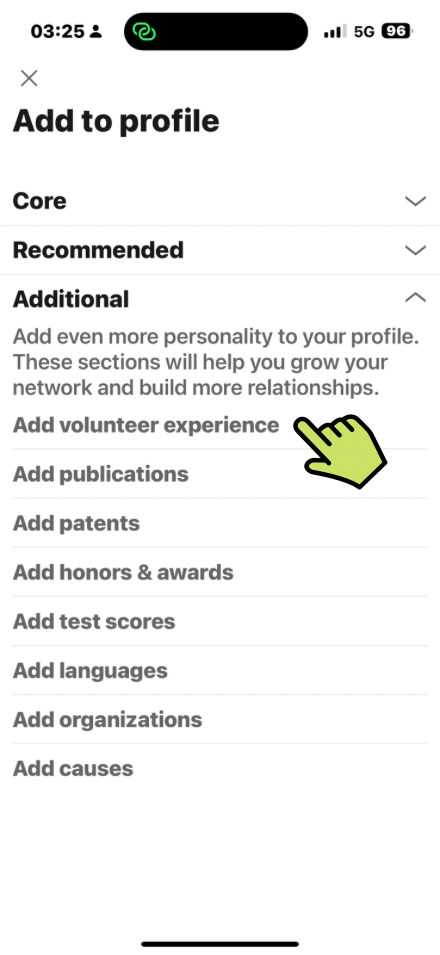
Add more personality to your LinkedIn® Profile by completing optional information in the Additional Section of your LinkedIn® profile.
- Volunteer Experience
- Publications
- Patents
- Honors & Awards
- Test Score
- Languages
- Organizations
- causes
Framework Note
Optional profile sections should earn their place. Add one when it provides evidence that supports your Primary Reason or an important Supporting Motivator – not simply because LinkedIn® makes the section available.
Publications may strengthen Thought Leadership, volunteering and causes may support Contribution, and honours or patents may reinforce Credibility. Use the framework to decide what deserves space on your profile. Explore the Why Are You Really on LinkedIn®? framework.
Where to Find These Settings
- Click Add Section
- Choose from the list of 8 additonal section

Add Volunteering Information
- Enter Organization
If the organization has a LinkedIn® Page it will show in the list. If not, just enter the official name of the organization.
- Enter Role (similar to a job title)
- Choose from the list of Causes
– Animal Welfare
– Arts and Culture
– Children
– Animal Welfare
– Children
– Civil Rights & Social Action
– Economic Empowerment
– Education
– Environment
– Health
– Human Rights
– Disaster and Humanitarium Relief
– Politics
– Poverty Eleviation
– Science and Technology
– Social Services
– Veteran Support
- Tick box to indicate if your currently volunterring this role
- Enter Start Date
- Enter End Date (if applicable)
- Enter Description (2000 character limit)
- Add Media
Add Publication Information
- Enter Publication Title
- Enter Publication/Publisher
If the publisher/publication has a LinkedIn® Page it will show in the list. If not, just enter the official name of the Publisher/Publication.
- Enter Publication Date
- Enter additional Authors (optional)
You can only add people you are connected with. They are not notified that you have added them.
- Enter Publication URL (link to a website etc)
- Enter Description (2000 character limited)
Add Patent Information
- Enter Patent Title
- Enter Patent or apllication number
- Add inventor
You can only add people you are connected with. They are not notified that you have added them.
- Select Patent issued or Patent pending
- Add Issue date (if applicable)
- Enter Patent URL (link to a website etc)
- Enter Description (2000 character limited)
Add Honors and Awards Information
- Enter Title
- Associate with (roles) – from your work experience section
- Enter Issuer
- Enter Issue date
- Enter Description (2000 character limit)
- Add media
Add Test Scores Information
- Enter Title
- Associate with (roles) – from your work experience section
- Enter Score (just text)
- Enter Test date
- Enter Description (2000 character limit)
Add Additional Languages
- Enter Language (just text)
- Select Proficiency
Choose from:
- Elementary proficiency
- Limited working proficiency
- Professional working proficiency
- Full professional proficiency
- Native or bilingual proficiency
Add Organizations Information
- Enter Organization Name (just text)
- Enter Position held (just text)
- Enter Associated with (role) – from your work experience section
- Tick box to indicate if Membership is current/ongoing
- Enter Start Date
- Enter End Date (if applicable)
- Enter Description (2000 character limit)
Add Causes causes Your Care About
Tick the causes you care about. Choose from the following listL
– Animal Welfare
– Arts and Culture
– Children
– Animal Welfare
– Children
– Civil Rights & Social Action
– Economic Empowerment
– Education
– Environment
– Health
– Human Rights
– Disaster and Humanitarium Relief
– Politics
– Poverty Eleviation
– Science and Technology
– Social Services
– Veteran Support