How To Add Volunteering To Your LinkedIn® Profile

A 5 minute lesson on how to add Volunteering Experience to your LinkedIn® profile.

Fox Tucker
Add volunteering to LinkedIn® profile by Fox Tucker

Lesson Introduction

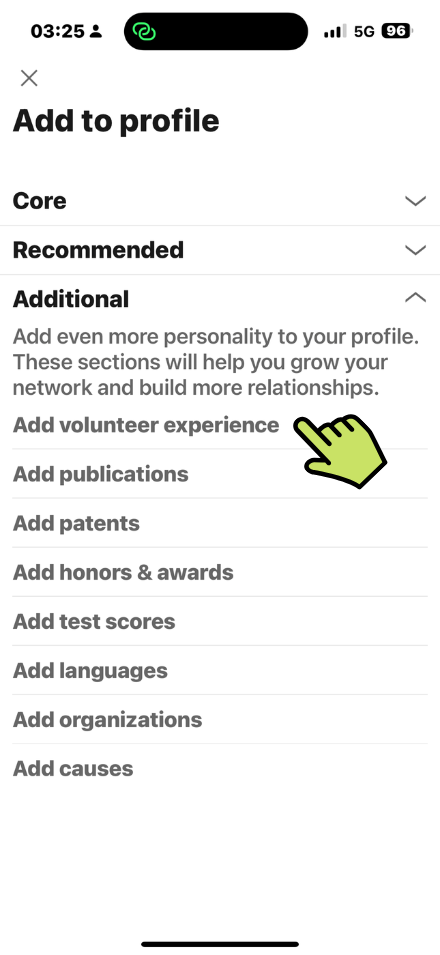
Add more personality to your LinkedIn® Profile by completing optional information in the Additional Section of your LinkedIn® profile.

Where to Find These Settings

  • Click Add Section
  • Click Add Volunteer Experience

Add Volunteering Information

  • Enter Organization

If the organization has a LinkedIn® Page it will show in the list. If not, just enter the official name of the organization. 

  • Enter Role (similar to a job title)
  • Choose from the list of Causes

– Animal Welfare
– Arts and Culture
– Children
– Animal Welfare
– Children
– Civil Rights & Social Action
– Economic Empowerment
– Education
– Environment
– Health
– Human Rights
– Disaster and Humanitarium Relief
– Politics
– Poverty Eleviation
– Science and Technology
– Social Services
– Veteran Support

  • Tick box to indicate if your currently volunterring this role
  • Enter Start Date
  • Enter End Date (if applicable)
  • Enter Description (2000 character limit)
  • Add Media
Share this LinkedIn® Course
Digital Marketing Director & Founder of Leaders Social
Follow:
Fox Tucker is Digital Marketing Director at Outlook Publishing and founder of Leaders Social. He created more than 40 free LinkedIn® media courses and specialises in LinkedIn® Company Pages, LinkedIn® profiles, digital strategy, SEO and online visibility.