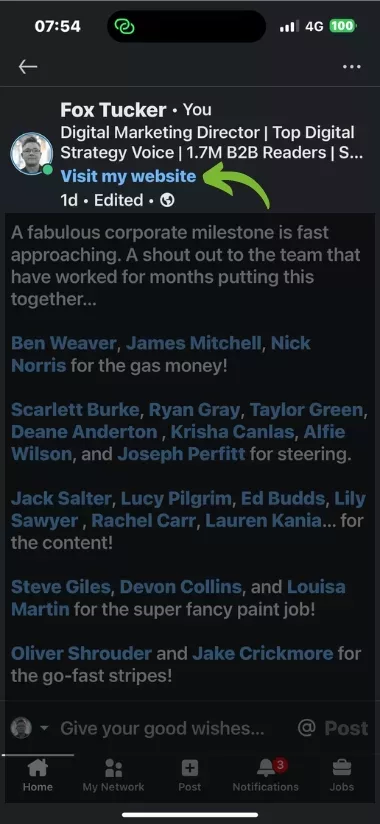
There’s so much more to your contact section than just your email address and phone number. There are incredible opportunities to showcase important additional elements of your personal brand.
1. Add Custom Profile URL
When you signed up for LinkedIn® you were auto-assigned a profile link. It’s usually made up of your name and a bunch of random numbers. For example: /Jane-doe-834635322
Yuck!
You can change this. LinkedIn® keeps a previous custom URL associated with your profile for a limited period, so avoid changing it unnecessarily.
Your New Custom Profile Link Must Be Unique: If /janedoe is already taken, consider adding a hyphen between your first and last name /jane-doe, or add country at the the end /janedoe-usa
Short is Sweet: Just sayin’
Promote your New Link: Add the link to your website, social media profiles, and business cards etc
We saw a big increase in traffic to the website added as a custom button. The View my portfolio button performed better than the View my website button.
8 Simple Steps in 30 Seconds
2. Add Basic Contact Info
Email Address
Phone Number
Phone Number Type: Home, Work, or Mobile
Address: A simple text field
Expert Tip
I use my personal email address to log in to LinkedIn®, but show my work email address in my contact info.
I have never added my phone number. I already get enough spam calls.
I have never added my address. It has made no difference whatsoever.
3. Add Birthday
Just Date and Month. Not the year.
4. Websites
You can add up to three website links to your LinkedIn® profile. Choose the three that are most useful to the people you want to reach.
Personal
Company
Portfolio
Blog
RSS Feed
Other
Expert Tip
If you don’t have a website, you may benefit from creating a free linktr.ee website.
Linktr.ee is a popular way to create a simple but effective landing page.
You can see an example I have created at linktr.ee/foxtucker
Important Note: I recommend that you DO NOT add the linktr.ee link to your email signature. Only include it where it is genuinely useful and keep the destination current.
LinkedIn® allows you to add details of a very limited list of supported Instant Messenger services.
Skype
ICQ
Google Hangouts
QQ
WeChat
6. Add Custom Link
A profile custom button is a Premium feature available to eligible LinkedIn® Premium Business, Sales Navigator and Recruiter Lite members.
LinkedIn® Premium Notes
Custom Button: As a Premium Business Member, Sales Navigator, or Recruiter user, show people the best way to engage with you by adding a custom button to the top of your profile. Current button options include Visit my website, Visit my store, View my portfolio, View my blog, Book an appointment, View my newsletter, and View my services. A super-cool feature is that you can tick a box to Increase button visibility on your posts, messages, and search results.
We saw a big increase in traffic to the website added as a custom button. The View my portfolio button performed better than the View my website button.
Action
Edit as appropriate using the guidelines in this lesson.
Digital Marketing Director & Founder of Leaders Social
Follow:
Fox Tucker is Digital Marketing Director at Outlook Publishing and founder of Leaders Social. He created 90+ free LinkedIn® courses and specialises in LinkedIn® Company Pages, LinkedIn® profiles, digital strategy, SEO and online visibility.
Course details:
How To Optimize Your Contact Information On LinkedIn®
Fox Tucker is Digital Marketing Director at Outlook Publishing and founder of Leaders Social. He created 90+ free LinkedIn® courses and specialises in LinkedIn® Company Pages, LinkedIn® profiles, digital strategy, SEO and online visibility.
This series sets out to optimize the Basics of your LinkedIn® Profile. The objective is to rock your LinkedIn® Profile and elevate your discoverability, visibility and reach On LinkedIn®.
Each lesson can be completed independently or as part of the series.
Lessons In This Series
Requirements
A LinkedIn® Profile
This Free LinkedIn® course is designed to be carried out using a desktop or laptop, because switching between tabs on a smartphone is just crazy
The editing of your LinkedIn® Profile can be carried out using the browser or LinkedIn® App on your smartphone. Some features can only be activated or edited using the official LinkedIn® App
Audience
LinkedIn® users wanting to elevate their LinkedIn® Profile beyond the basic settings
Entry-Level Professionals
Mid-Career Professionals
Senior Executives
C-level Executives
Career Changers
Job Seekers
Networking Enthusiasts
Personal Brand Builders
Thought Leaders
Content Creators
Sales Leads Generators
Expert Tip
Across lessons, I use a box like this to offer expert tips based on my years of experience in optimizing LinkedIn® profiles.
LinkedIn® Premium Notes
I use a box like this to identify elements that are only available to LinkedIn® Premium users. LinkedIn® offers a number of premium profile services including LinkedIn® Premium and LinkedIn® Sales Navigator.