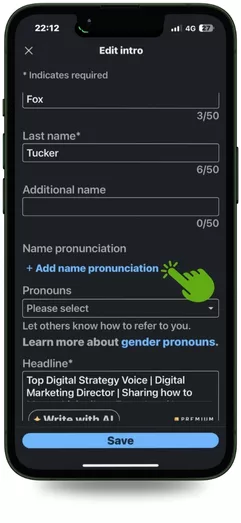



How To Add Name Pronunciation On LinkedIn®

LinkedIn®’s voice introduction lets you add a personal touch to your profile. Learn how to create a polished, engaging introduction that reinforces your brand and makes a lasting impression.

Fox Tucker

Lesson Introduction

LinkedIn® lets you record your preferred professional name pronunciation so other members can address you correctly. There’s a feature called Add Name Pronunciation that lets you record your preferred professional name pronunciation for up to 10 seconds. Recording and editing are available only in the LinkedIn® iOS or Android app, not on the desktop site.

You have 10 seconds of recording time. Use the recording primarily for pronunciation. If your name is short and there is time left, a brief natural sign-off is fine, but keep the pronunciation clear and easy to understand.

An Example Recording

“Hello I’m Fox Tucker, I love helping people thrive On LinkedIn®.”

How To Add Your Name Pronunciation

Share this LinkedIn® Course
Digital Marketing Director & Founder of Leaders Social
Follow:

Fox Tucker is Digital Marketing Director at Outlook Publishing and founder of Leaders Social. He created more than 40 free LinkedIn® media courses and specialises in LinkedIn® Company Pages, LinkedIn® profiles, digital strategy, SEO and online visibility.